
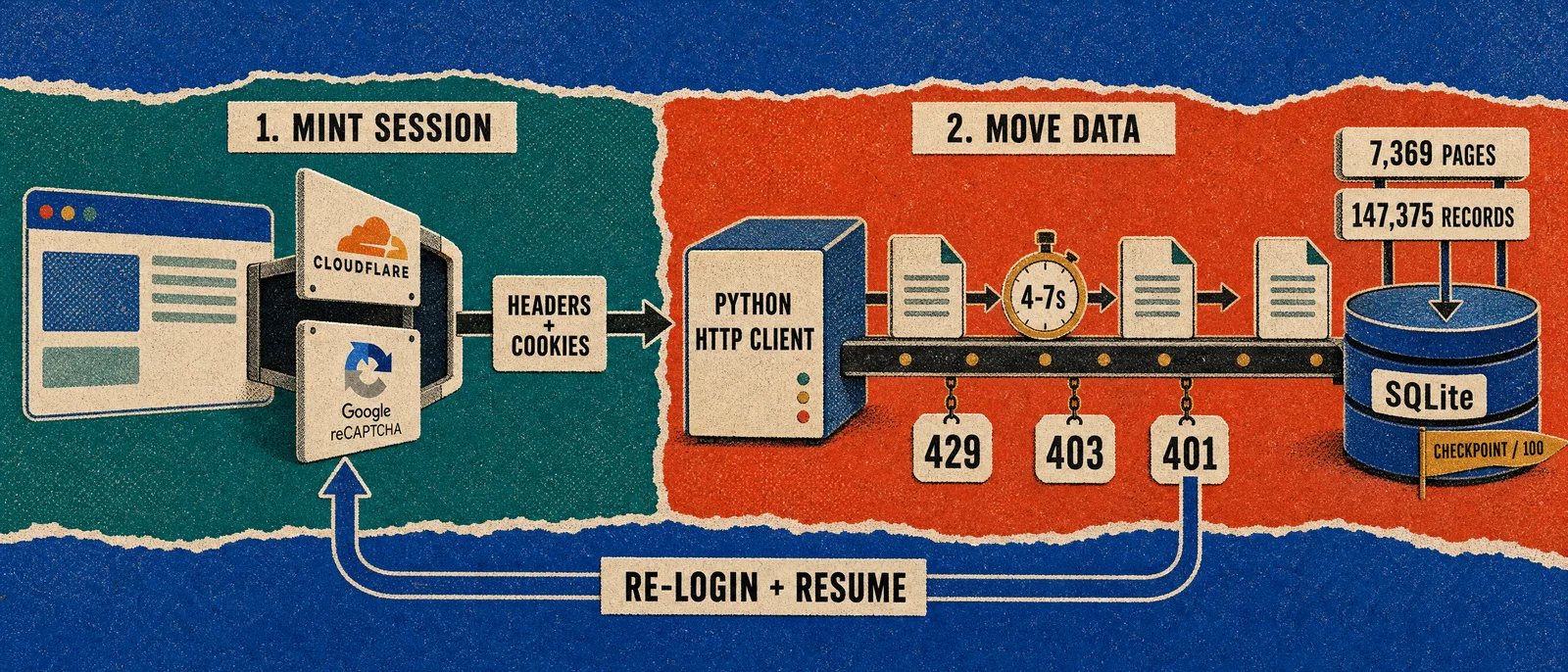
Mint the session in a real stealth browser that can pass Cloudflare and Google reCAPTCHA, then move the data with a sequential Python HTTP client. That split extracted 147,375 investor records across 7,369 pages from an authorized B2B directory. A supervisor re-logged in on HTTP 401 and resumed at the next unfetched page.
What made this directory hard to extract?
A client had a paid, authorized account on a B2B investor directory and no bulk export. The data they were entitled to read lived behind a paginated JSON API. As of 6 August 2026 the API reported 147,375 investors across 7,369 pages at 20 records per page.
Four defenses sat between a working cookie and a finished database.
| Layer | What it does | What it blocks |
|---|---|---|
| Cloudflare | Fingerprints the client and issues a cf_clearance cookie only after an interactive challenge | Plain HTTP clients and stock headless Chrome |
| Google reCAPTCHA v2 | Requires a "not a robot" token on the authenticated data path | A logged-in session that never solved the widget |
| Short-lived JWT | accessToken lasts about 2 minutes | Any run that treats the first cookie as durable |
| Forced logout | Observed sessions died after about 90 data pages | A single-shot "fetch every page" script |
| HTTP 429 | Rate limit under sustained throughput | Concurrent or bursty scrapers |
This was not one wall. It was a stack, plus a clock.
The client was authorized to read the directory. The platform simply did not offer a way to take it with them.
Why does a plain HTTP client fail first?
A typical scrape is plumbing: find the endpoint, replay a cookie, paginate, store. This job inverted that ratio. The JSON contract was clean. Getting a cookie that Cloudflare and the application would both honor was not.
The first request from Python's urllib received the Cloudflare challenge page instead of JSON. There was no cf_clearance and no browser fingerprint. A stdlib client can consume a valid session. It cannot mint one.
That first attempt was still the right first move. It proved the response envelope:
data.response_object = {
  current_page, total_pages, per_page,
  total_investors_count, investors: [ ... ]
}
Once we had that shape, storage, resume, and checkpoints were mechanical. The remaining work was staying authenticated long enough to walk 7,369 pages.
Start with plain HTTP. It tells you whether the problem is defense or plumbing. It also becomes the fast data mover once a session exists.
What did we try before the architecture worked?
We escalated. Cheap strategies first. Fragile ones only after the previous one failed in a specific way.
| Step | Tool | Result |
|---|---|---|
| 1 | Python stdlib HTTPS, replayed browser cookie | Learned the API contract. Could not obtain cf_clearance. |
| 2 | Stock headless Chromium | Cloudflare's challenge stayed up. navigator.webdriver and fingerprint leaks. |
| 3 | Chrome DevTools Protocol on a real Chrome | Better control. Still no reliable clearance cookie. |
| 4 | CloakBrowser (stealth Chromium) over CDP | Cloudflare accepted the session. reCAPTCHA still blocked the data path. |
| 5 | 2Captcha on the reCAPTCHA site key | Login could complete. Manual cookie paste still died mid-run. |
| 6 | Auto-login plus a supervisor loop | Session death became a restart, not a human fire drill. |
CloakBrowser is a stealth Chromium server that patches the fingerprints Cloudflare keys on and exposes CDP on port 9222. CDP solved control. CloakBrowser solved trust at the edge. 2Captcha solved the application wall.
None of those tools should paginate 7,369 pages. They exist to mint a session.
How did we split session minting from data movement?
The working system is two programs with one shared file format.
  laptop: autologin (Playwright)
       |
       |  CDP over HTTPS, port 9222
       v
  Railway: CloakBrowser (stealth Chromium)
       |  passes Cloudflare
       |  solves reCAPTCHA via 2Captcha
       |  exports cookies.json
       v
  laptop: auto_relogin
       |  cookies.json -> header profile
       |  same format as a Copy as cURL import
       v
  laptop: Python scraper (stdlib only)
       |  paced, sequential, transactional
       v
  supervisor: on HTTP 401, re-login and resume
The expensive path (CloakBrowser + 2Captcha + Playwright) runs only when a session must be minted. That is once per forced logout, not once per page.
The cheap path is a dependency-free Python 3.10+ client. It replays cookies, refreshes the JWT, waits 4-7 seconds, and writes each accepted page to SQLite plus a flat JSON file.
Auto-login is additive. A human can still paste a fresh Copy as cURL into import-curl. The scraper loads --headers-file either way. Tests and resume logic never know how the cookie was obtained.
Most large extractions fail because they ask one tool to do both jobs. A stealth browser per page is slow and brittle. A plain HTTP client cannot log in. Splitting them is what made 7,369 pages finishable.
The same split generalizes. When the defense is browser-fingerprint binding rather than Cloudflare — Slack, for example, rejects its own session tokens from any non-browser client — the browser has to run the data path too. We used exactly that to track job postings and buying signals across Slack workspaces.
Why did the stealth browser have to run on Railway?
We first ran CloakBrowser on the same laptop as the captcha solver. Cloudflare's challenge stayed persistent. Even a valid 2Captcha token often failed on submit.
Moving CloakBrowser to a persistent Railway container fixed both problems.
A long-lived Railway egress presents one stable environment, so cf_clearance can be obtained and held. A residential laptop IP plus a freshly launched stealth browser kept tripping the persistent challenge.
A reCAPTCHA token is also sensitive to where it is solved versus where it is submitted. The solver mints the token. The browser consumes it. Those two steps need a consistent IP and fingerprint. On Railway they happen in one place.
The local driver is one line:
browser = playwright.chromium.connect_over_cdp(CLOAKSERVE_URL)Brain on the laptop. Browser in the cloud. If Railway's IP is burned, the egress can move without rewriting the login script.
How does the paced Python scraper stay alive?
Once a header profile exists, the scraper has three jobs: refresh the JWT, back off honestly, and refuse to look like a burst.
How does the access token get refreshed?
The accessToken is a JWT with a lifetime of about 2 minutes. Before every request the client reads the exp claim and refreshes if the token expires within 30 seconds.
Refresh uses the longer-lived refreshToken (about 30 days) against the session endpoint, then writes the new cookies back into the same header profile. That keeps a run alive across page fetches without a full re-login, until the refresh token itself is rejected.
What does the scraper do on 429, 5xx, and 401?
| Situation | Wait |
|---|---|
Retry-After header | Honor it, capped at 300 seconds |
| HTTP 429 | Linear: 60, 120, 180, 240, then 300 seconds |
| HTTP 5xx or network error | Exponential, capped at 60 seconds |
| HTTP 401/403 with a refresh token | Refresh once, retry the page once |
| HTTP 401/403 after that refresh | Exit. Do not hammer a dead session. |
429 gets a longer linear wait because the server already said slow down. A 401 after refresh is terminal on purpose. The worker exits with a fixed marker so the supervisor can take over. Looping on a dead session is how you lock the account.
Why 4-7 seconds between pages?
Every data request waits --delay 4 --jitter 3, a fresh uniform draw from 4 through 7 seconds. The CLI will not accept a base delay under 1.0 second.
Fixed intervals are easy to flag as automation. A 4-7 second window looks like a person paging through a list and rarely trips 429. At a 5.5 second average, throughput is about 650 pages per hour. The full directory is about 11 hours of request time, except the run is never that clean, because the session dies first.
Requests are sequential. One process. No worker pool. Concurrency is how you get banned at page 3,000.
What happens when the platform force-logs you out?
Observed sessions died after about 90 data pages, independent of how polite the client was. That is server behavior, not a documented quota. A cookie that worked at page 1 was dead by page 91.
A small supervisor wraps scrape:
- Launch the paced scraper with the current header profile.
- Stream output and wait for exit.
- Exit 0 means the last page was reached. Stop.
- If stderr matches a known auth-failure marker, run auto-login, rewrite the header profile, and relaunch. Resume continues at the next unfetched page.
- If auto-login fails (cold container, captcha service down), sleep a random 10-15 minutes and try the harvest again.
- Any other nonzero exit stops the run. Disk errors, schema changes, and checkpoint failures are not retried.
The supervisor only self-heals authentication. That is the safety rule. Blindly looping every failure is how a scraper writes garbage for six hours.
It does not parse HTTP codes. It matches a short list of markers the client already prints:
- rejected the captured request with HTTP 401/403
- rejected the refreshToken
- no refreshToken
- refresh response did not provide a new accessToken
Those markers mean the worker cannot revive the session. That is the only precondition for a fresh auto-login.
When the scraper relaunches, it does not start at page 1. It reads the latest failed or interrupted run that matches account, round, and requested page size, then continues at the next page. An explicit --start-page overrides that. Over a 7,369-page directory with a logout every ~90 pages, resume is the difference between finishing and restarting from zero every morning.
How do we prove pages were not lost or duplicated?
A 147,000-record extract that you cannot audit is a liability.
Transactional writes. Every accepted page is committed to SQLite in one transaction and written as <raw-dir>/<page>.json atomically: write <page>.json.tmp, then rename over the target. A crash mid-page does not leave a half-written file or a half-committed row.
Checkpoints every 100 pages. At --checkpoint-every 100 the runner stops and proves the last block:
PRAGMA quick_checkandPRAGMA foreign_key_check- page numbers are contiguous
- each JSON file's
current_pageand investor count match SQLite - investor IDs on the page are unique
- relationship-row counts match the JSON
A failed checkpoint fails the run. The hole is surfaced immediately instead of traveling for another 2,000 pages.
Source IDs, not fuzzy merge. Investors and contacts keep their source primary keys. We do not merge two rows because the names or emails look similar.
Overlap is allowed. Duplication is not. The live directory can drift between requests, so adjacent JSON pages can share records. That is raw observation overlap. The normalized tables upsert on source ID, so the SQLite view stays one row per identity.
Offline export. CSV is built from SQLite only. inspect and export-csv do not touch the network. You can reshape the file without asking the platform again.
Raw JSON is the evidence. SQLite is the product.
What did the finished run look like?
These numbers are from the local SQLite database after the run that completed on 6 August 2026. They are not estimates.
| Fact | Value |
|---|---|
| Investors reported by the API | 147,375 |
| Unique investors stored | 145,568 |
| Contact persons stored | 61,487 |
| Pages reported / last successful page | 7,369 |
| Successful page fetches logged | 7,385 |
| Requested page size | 20 |
| Passed checkpoint blocks | 74, covering pages 1-7369 |
| Scrape runs in the database | 110 (most are expected 401 stops) |
| SQLite file size | 339 MB |
| Request pacing | 4-7 seconds, one process |
| JWT lifetime | about 2 minutes, refreshed in-client |
| Observed logout | about every 90 pages |
| Captcha solves | per auto-login cycle, not per record |
The 1,807-row gap between "API reported" and "unique stored" is the overlap and drift above. Adjacent pages are not a clean partition of a frozen set.
Most of those 110 runs are not bugs. They are the forced logout, recorded as failed or interrupted, then continued by the next process at the next page. The last completed slice started at page 7,288 and finished the tail.
When is this kind of extraction legitimate?
Everything above ran against an account the client was authorized to use, for data they had a right to export, at a volume the platform did not support.
The techniques (stealth browsing, captcha solving, cookie harvest) are dual-use. They belong in authorized extraction, QA, and migration work. They do not belong in anyone else's directory.
If you are considering a job like this, the first question is not how to pass Cloudflare. It is whether you have the right to read the data, and whether you will stay sequential and paced once you do.
The target platform is unnamed on purpose. CloakBrowser, Railway, 2Captcha, Playwright, and SQLite are named because they are general-purpose tools. Naming them is not an endorsement by the directory we extracted.
Frequently asked questions
Only when you are authorized to access the account and the data. This run used a paid client account the client controlled, because the platform offered no bulk export. Stealth browsers and captcha solvers are dual-use. Authorization comes first.
A remote stealth browser is slow, expensive, and fragile. This directory was 7,369 pages. The browser ran only to pass Cloudflare and reCAPTCHA and export cookies. A stdlib Python client then paginated the JSON API.
The HTTP client treats a 401 it cannot refresh as terminal and exits with a fixed error marker. A supervisor then re-runs auto-login, writes a new header profile, and relaunches scrape. Built-in resume continues at the next unfetched page.
Records are keyed by source IDs, not by name or email. Re-fetching a page replaces that page JSON and upserts entities. Adjacent pages can overlap because the live directory drifts. That is observation overlap, not a merge bug.
No. This stack runs one sequential process. The supported pace is --delay 4 --jitter 3. The CLI refuses a base delay under one second.